Use case
Turn a customer request into work people can follow
Give support and operations a clear way to receive requests, ask for missing details, coordinate other teams, and finish with a reviewable response.
A familiar situation
Own the coordination without doing every specialist task
A customer asks support to delete their account data. Support can acknowledge the message, but another team owns the product database and a reviewer needs to assess the response. Forwarding the ticket does not establish who is responsible for the whole request.
Privacy Requests gives the coordinator one case to follow. Keep the original details, verification work, collection tasks, and response preparation together. Specialists contribute to assigned work while the owner watches the overall progress and keeps the requester informed.
See the actual product screens →From intake to outcome
A practical way to run the request
Capture the request clearly
Direct the customer to your published portal. Check the request type and the details they provide; clarify ambiguous scope instead of assuming an ordinary support request is ready for fulfillment.
Verify and ask for what is missing
Follow your organization’s verification process and record the review. Use requester follow-up when you need clarification, then keep the answer connected to the case.
Assign tasks people can finish
Choose the relevant system or task template, name an assignee, and provide specific instructions. Check the evidence returned before considering collection complete.
Prepare the handoff to the reviewer
Assemble the response and select only the intended attachments. Use self-review or obtain the configured reviewer’s approval, manage the delivery link, and resolve the remaining closure checks.
Make each responsibility clear
Agree who owns each part before the request is urgent. These are suggested working responsibilities; workspace roles determine access.
| Person | Responsibility | Useful result |
|---|---|---|
| Support or operations owner | Coordinate the full request | A case with clear ownership and follow-up |
| Data owner | Complete assigned collection work | Evidence and task results for the coordinator |
| Designated reviewer (if configured) | Review the prepared response | Approval before delivery becomes available |
Make the next action visible
The most useful question in a busy queue is often “what are we waiting for?” A case owner, assigned tasks, and a connected response record make that easier to answer. Before handing a request to a colleague, leave enough context to explain the missing information, outstanding work, and any decision that still requires review.
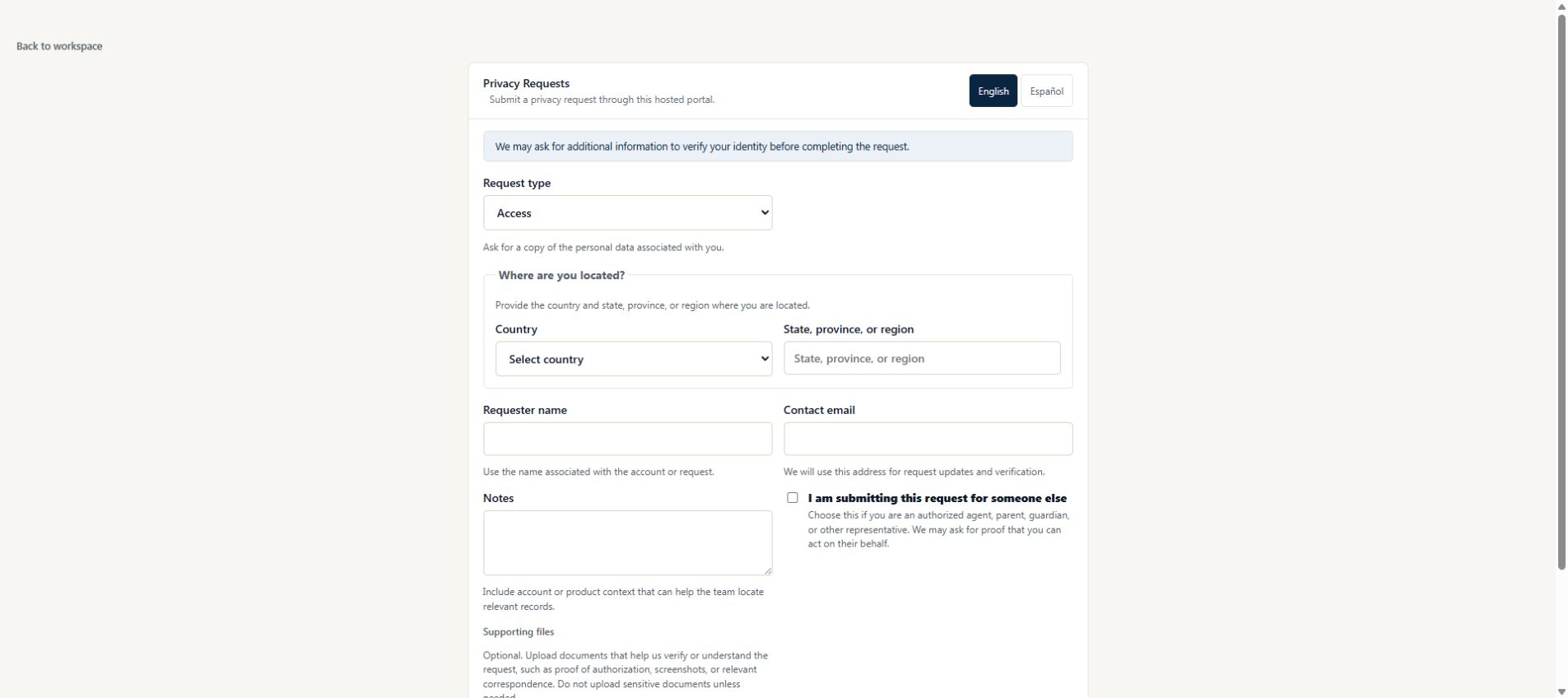
Before your first request
Set up the people and the process
Rehearse the whole workflow with controlled addresses and fictional data. A working intake form is only the first step.
Learn how to work from the case inbox →- Put the portal link where support staff can find and share it.
- Agree who takes ownership when a new request arrives.
- On Free, write manual tasks. Reusable templates require Team or Business; paid upgrades are currently unavailable.
- Use fictional data to practice follow-up, review, delivery, and closure.
What your team still owns
The portal gives customers a clear intake path, but it does not automatically turn every support conversation into a case. Your team must recognize requests and route them appropriately. The platform also does not perform deletion in your product systems; assigned people carry out and document that work.
Read the security safeguards and current plan availability before deciding whether the workflow fits your organization.
Try a real workflow
Give your next request a clear path
Start with a workspace, a responsible owner, and a reviewer.
Compare workflows for other teams →Make the covering teammate’s next step clear
Fictional handoff: preserve the original request, confirm the approved scope, then ask Sam for the outstanding archive-search result. Changing the case owner alone does not resolve that task. Use the reviewer handoff.
Choose self-review, a single reviewer or a plan-dependent approval chain.