Preserve requests that arrive outside the portal
A portal is a useful intake route, not a reason to lose a request sent elsewhere. Preserve the original message, receipt time and source reference, then create a case and assign an owner. Avoid making someone repeat their request solely for administrative convenience.
- Use a controlled test to check contact information, request type, original wording and confirmation.
- Route a support email internally and keep its original date visible; do not silently replace it with the date staff entered the case.
- UK ICO guidance explains how to recognize a subject access request; check the rules for other jurisdictions separately.
| Field | Why collect it | Avoid |
|---|---|---|
| Contact route | Send follow-up and delivery notices | Collecting unrelated identifiers |
| Relationship context | Locate likely accounts or records | Forcing a legal category |
| Request in their words | Preserve intent and scope | Rewriting the request at intake |
Collect only useful context
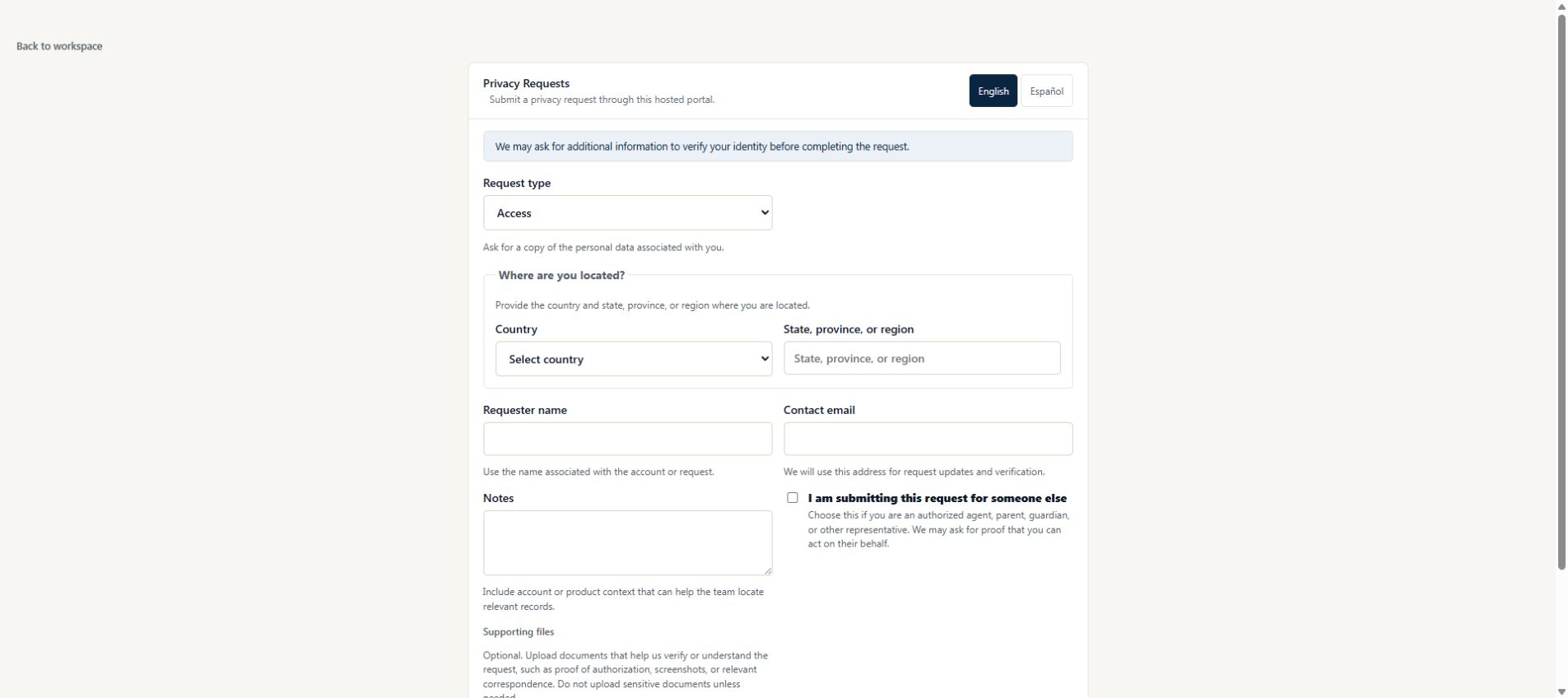
The form should gather request type, requester contact details, account context, and supporting notes. It should avoid unnecessary sensitive uploads unless the responder needs them later.
- Use plain-language request type labels.
- Explain what information helps the company locate records.
- Keep representative and special-case fields clear but not intimidating.
Turn submissions into cases
A portal is only useful if submissions become trackable cases. The response team should immediately see where the request came from, what type of request it is, who owns it, what is due next, and whether details are missing.
- Create a case reference for the requester.
- Show unassigned and newly submitted cases in the inbox.
- Preserve the submitted details in the case history.
Keep requester experience clear
Requesters should understand that the company controls the case and response decisions. The portal should confirm receipt and direct follow-up through the right company channel.
- Avoid promising legal outcomes or exact deadlines.
- Provide confirmation and next-step language.
- Keep responder review notes out of the public form.
Example: a customer uses a different contact email
Someone asks for records from an old account but submits the form with a new email address. The intake should preserve both pieces of information without treating the new address as proof of ownership.
- Ask for the account identifier needed to locate records, with a short explanation of why it helps.
- Let the requester describe the mismatch in their own words.
- Send the case to a responder who can decide the appropriate verification steps.
Check the complete submission experience
Test the form as a person who has never seen your internal process. A good form explains the company receiving the request, what to enter, and what happens after submission.
- Use a phone to submit a fictional request and check errors beside the affected fields.
- Confirm the success message includes a useful next step and support contact.
- Check that the response team can see the original answers and the correct portal.
Sources
Source list established September 20, 2026; new inline references checked September 24, 2026. These primary and regulator materials support the legal-rule summaries above; check the current rules that apply to your organization.
- EU General Data Protection Regulation, Articles 12 and 15 — Primary text for access rights, transparent communication, identity questions, and response timing.
- California Attorney General: California Consumer Privacy Act — Official overview of consumer rights, designated request methods, verification, and 45-calendar-day responses.
Common questions
Why use a DSAR intake portal instead of email?
A portal standardizes the information collected, creates a trackable case, and gives the requester a clearer starting point than a generic inbox.
Should a DSAR portal ask for identity documents up front?
Not by default. Many teams should first collect request context, then ask for verification information only when needed through an approved channel.
Can one company have multiple request portals?
Yes. Multiple portals can support different brands, products, regions, or intake experiences while still bringing requests into one response workflow.
Run privacy requests in one controlled workflow
Privacy Requests helps teams manage intake, verification, tasks, response preparation, secure delivery, and audit history without a broad enterprise suite.
Start free