Start with a manual draft
Free supports a manually written response and selected attachments. Reusable response templates require Team or Business; paid upgrades are currently unavailable. A template does not decide what may be disclosed.
- Review the exact message and each file before approval.
- Self-review or one designated reviewer is supported on Free. Ordered multi-reviewer chains require Business.
- For an access response, have an authorized person check applicable supplementary information as well as the copy of personal data.
Choose what belongs in the response
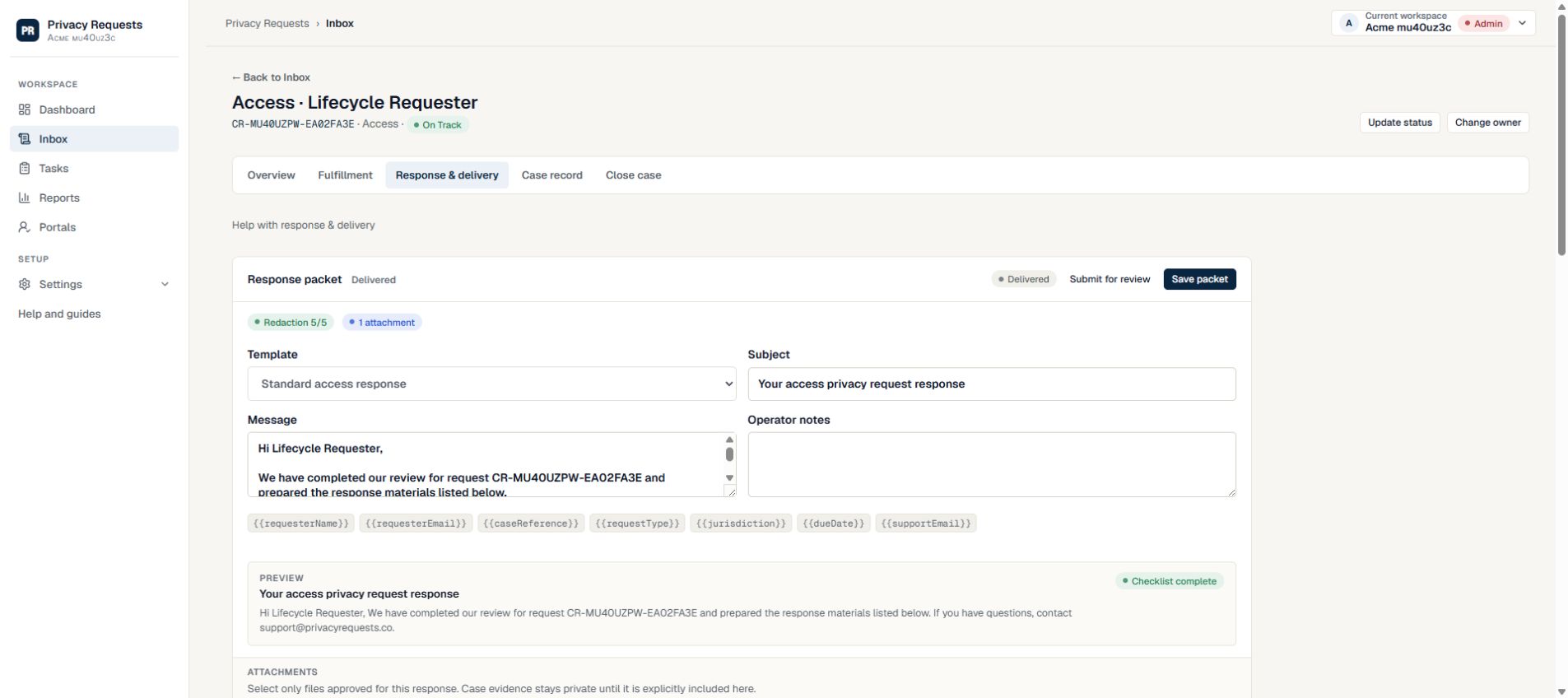
A response packet should match the verified requester and approved request scope. In Response & delivery, select an active template, create the packet, and use Files to send to choose which case files are intended for disclosure. Private case evidence is not included unless you select it.
- 1. Open a case and select Response & delivery.
- 2. Choose an active template, review the subject and message, and select Create response.
- 3. In Files to send, select Include in response only for files intended for the requester; select Remove to exclude a selected file.
- 4. Review the sensitive information checks and checklist, then select Continue to review. Confirm the saved recipient, message, and files before approving or submitting for approval.
Keep review explicit
Templates and generated copy do not replace human review. Self-review is the default: an Admin, Privacy Manager, or Legal Reviewer can approve the saved response directly. Adding named reviewers requires their approval instead. Approval records the decision before secure delivery; it does not send the response.
- Record reviewer approval before sending.
- Check that redactions, exclusions, and explanations are intentional.
- Do not treat response templates as legal advice.
Read the packet as the recipient would
Before approval, review the whole response rather than just the attached files. The subject, message, explanations, and selected attachments should tell a consistent story about what the company is providing.
- Replace incomplete template details and check the requester’s name and request reference.
- Open each selected file and confirm it belongs to the intended person and request.
- The PII scan flags potentially sensitive information; it does not determine what may lawfully be disclosed or guarantee that every sensitive item was found.
- Keep internal notes and investigation material out of the response unless the reviewer intentionally approves their disclosure.
Need more help?
Product support is available at support@privacyrequests.co. Requesters should contact the company handling the request first because that company controls the case record and response decisions.